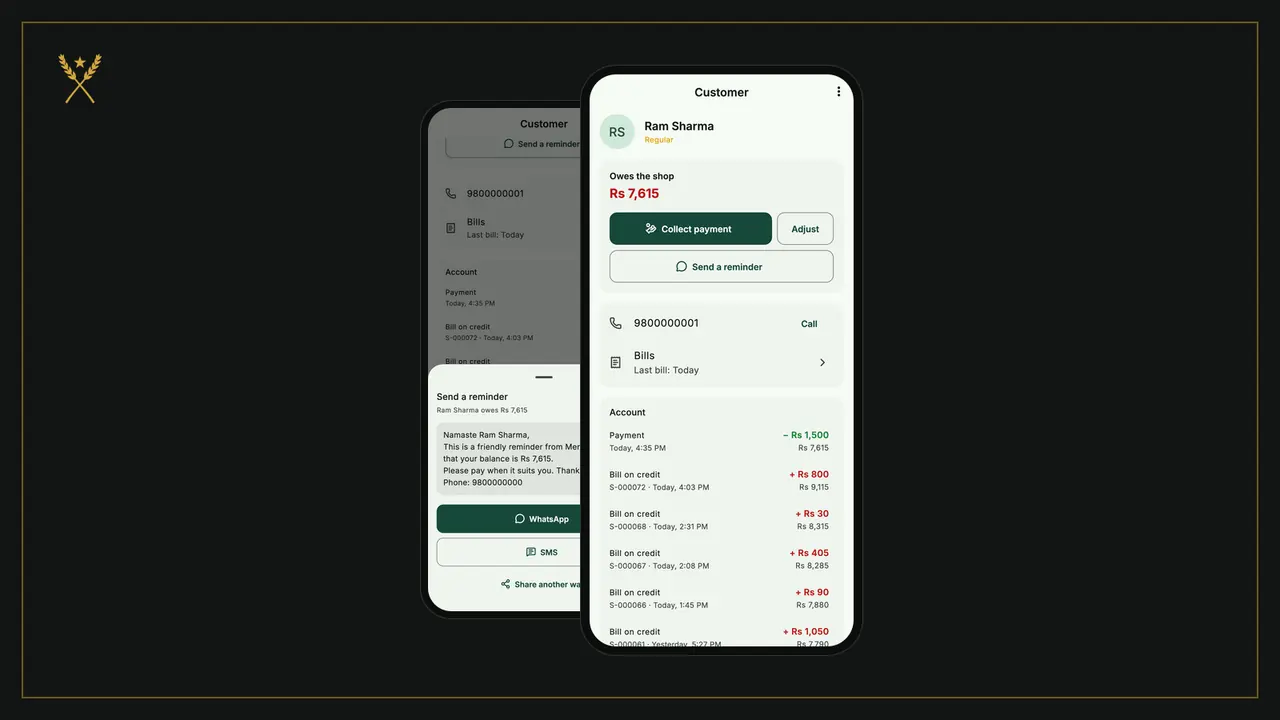
Udharo keeps regular customers coming back, and the khata is where it can go wrong: a missed entry, a smudged total, an awkward conversation about who paid what. In BSMM the khata fills itself in from your bills. A credit sale lands on the customer's page with its items, every payment is recorded with its date, and the balance is always worked out for you. This tutorial shows how to use BSMM as your khata app: add a customer, sell on credit, collect a payment and send a polite reminder.
1. Add a customer
Walk-in customers don't need a record. Add someone when you'll sell to them on credit, or want to see what they buy.
- Open the Customers tab and tap Add customer. (Home's Add customer button does the same.)
- Type the Name, then the Phone and Address if you have them. The phone number is what the reminder uses later.
- If they already owe you from your paper khata, put that in Already owes. It becomes the first line of their account.
- Turn on Regular customer for the people you see every week. Regulars are listed first and are quick to pick at the counter.
- Tap Save.
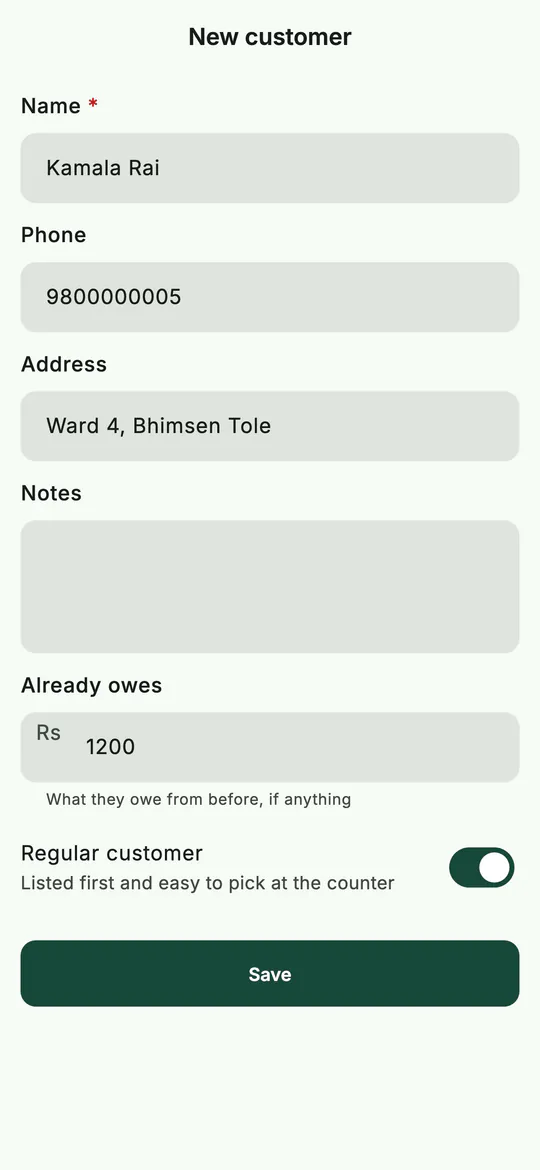 A new customer, with what they already owed from the paper khata.
2. Sell on credit (udharo) at the counter
- Make the bill as usual: add the items on New sale (see making a bill).
- Tap Walk-in · choose customer and pick the customer. Their balance shows beside their name, so you know what they owe before you give more.
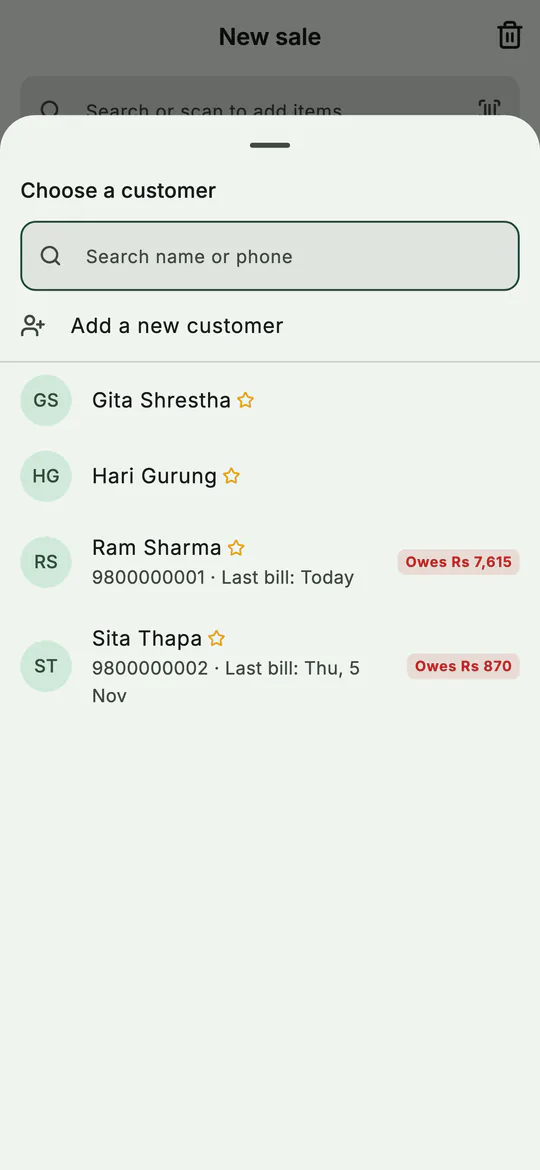 Pick the customer: what they already owe shows in red.
- Tap Charge.
- Type what they're paying now. If they pay nothing, make it 0.
- The sheet shows Left on credit in red, and under it Goes on their account.
- Tap Complete sale.
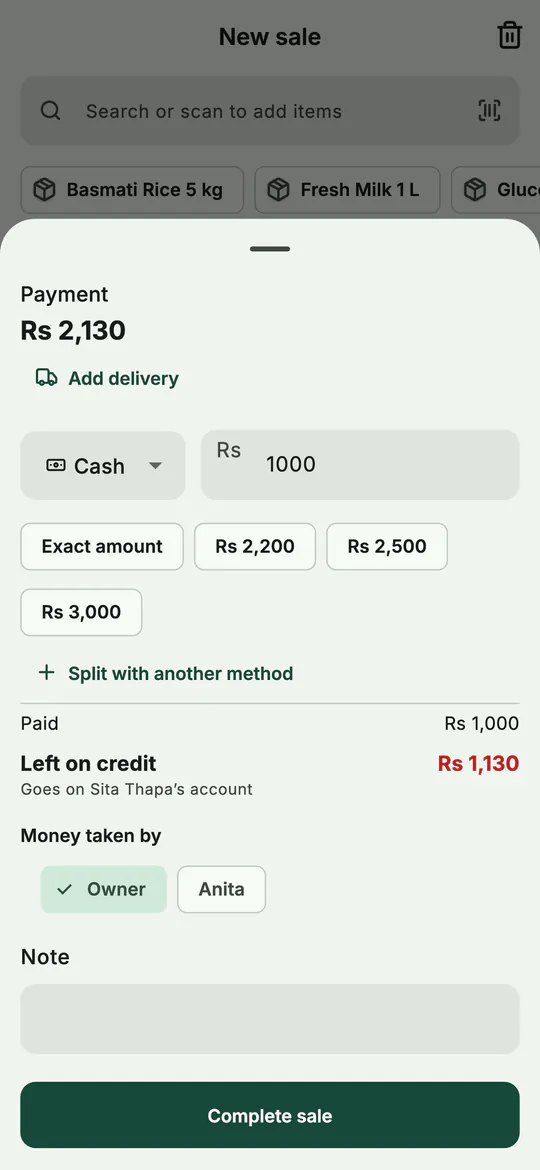 Part now, the rest on credit: BSMM shows whose account it goes on.
The sale is saved, the stock goes down, and the amount left goes on their khata in the same moment. A bill can only go on credit with a customer chosen: a walk-in bill must be paid in full.
3. See a customer's khata
Tap a customer on the Customers tab. Their page shows:
- Owes the shop and the amount, in red;
- Collect payment, Adjust and Send a reminder;
- their phone, with Call, and Bills, every bill they've had;
- Account: every line, newest first, with the balance after it.
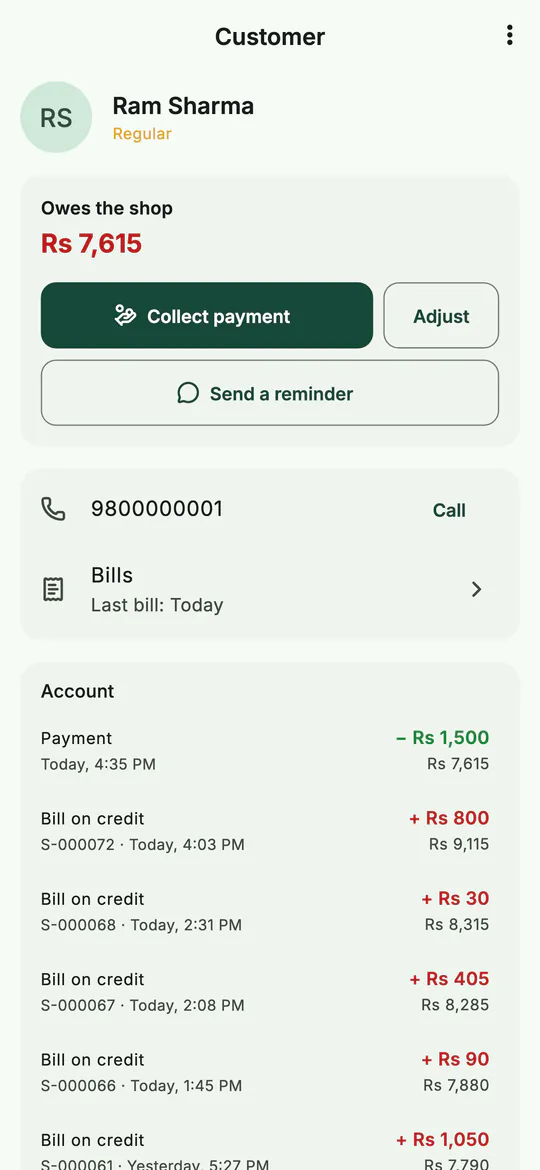 One regular's khata: the balance, the buttons, and every line.
Each account line says what it was: Bill on credit with the bill number, Payment, Return credit, Voided bill or Adjustment. Scroll down to see the whole history, back to the first line; the balance after each line explains how the total was reached.
The Customers tab shows the total all your customers owe at the top, and Home shows it under Dues now.
4. Collect a payment
- On the customer's page, tap Collect payment.
- The Amount starts at the whole balance, shown under it as All. Change it if they're paying part.
- Under Paid with, choose how they paid: Cash, Fonepay, eSewa, Khalti, Bank, Card or Other. If your shop has partners, also pick who took the money under Money taken by.
- Add a Note if you like, then tap Save payment.
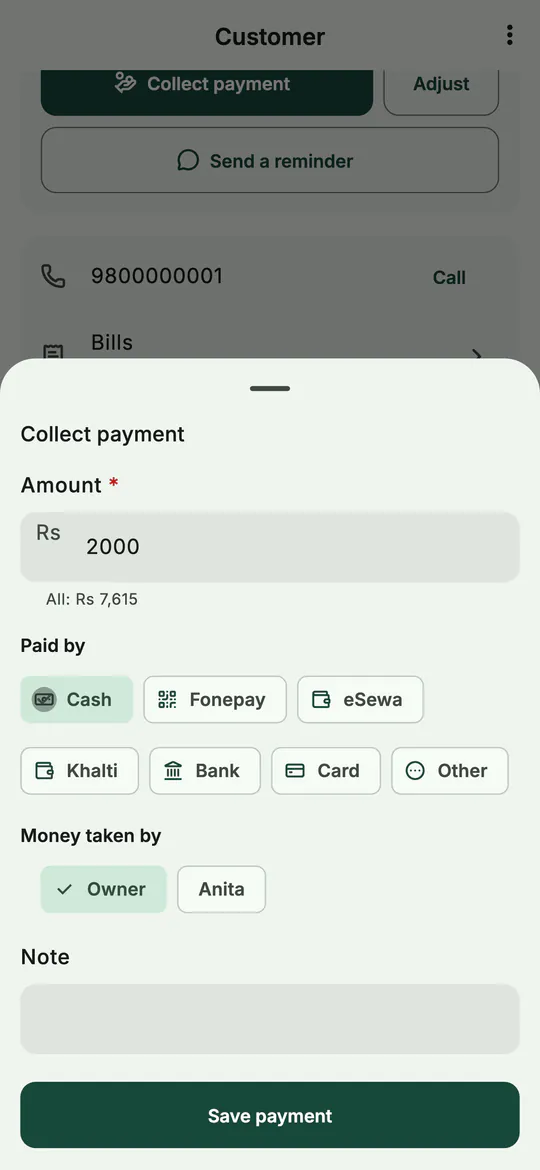 Collect any part of the balance, by any way of paying.
The payment goes on their account with today's date, and the balance drops at once. Part payments are fine: collect Rs 2,000 today and the rest next week.
You can also collect from a bill: open a bill that's on credit and tap Collect the due.
5. Send a payment reminder by WhatsApp or SMS
Asking for money face to face is the part most shopkeepers put off. BSMM writes the message for you.
- On the customer's page, tap Send a reminder.
- Check the message. It greets the customer by name, gives the balance and your shop's name, asks them to pay when it suits them, and ends with your phone number.
- Tap WhatsApp or SMS. The app opens with the message ready, and you press send there. Share another way sends it through any other app.
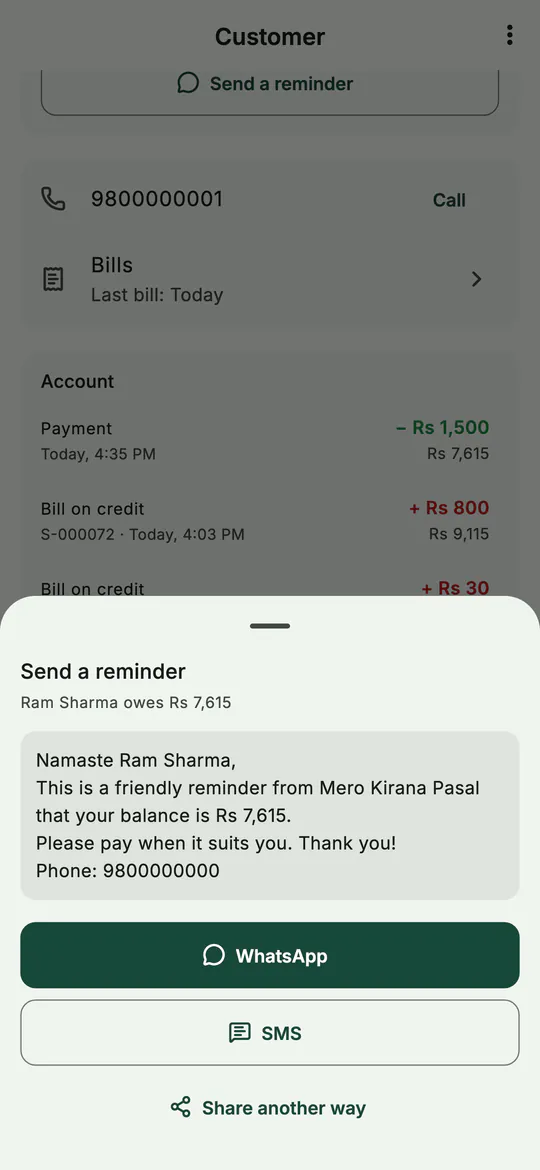 A friendly reminder with the exact balance, ready for WhatsApp or SMS.
BSMM never sends anything by itself: the message goes only when you press send. A number saved without a country code is treated as a Nepali number.
6. Fix a mistake or forgive a due
Payments go through Collect payment. For anything else, use Adjust:
- They owe more: an amount you forgot to record.
- They owe less: a correction, or a small due you decide to forgive.
Type the amount and a Reason, and save. The adjustment shows as its own line, so the history stays honest.
Tips
- Give credit only with the customer on the bill. That's what links the items to their khata and ends "I never bought that".
- Settle on a date. Salary day or the end of the month makes the reminder routine rather than personal.
- Look at Dues now on Home every week. It's money the shop has earned but can't spend yet.
- Turn on due reminders. In More › Notifications, Due reminders tells you in the morning when money or orders are due.
Common mistakes
- Recording a payment as an adjustment. Use Collect payment, so it counts as money in, by its method, in your reports and day-end.
- Selling to a regular as walk-in and writing it down elsewhere. Choose the customer on the bill instead; the khata then fills itself in.
- Trying to remove a customer who still owes. BSMM won't remove anyone who owes you or is owed. Settle or adjust the balance first.
What next
Customers owe you; you owe your suppliers. Next, record stock from suppliers and keep track of what you owe them.
For running udharo well, paper or app, read digital khata and udharo. The khata's features are summed up on the features page.
Questions
Can a customer pay in advance? Yes. If they pay more than they owe, the rest stays on their account as an advance (their page shows Paid in advance), and the next bill left on credit is set against it.
Can staff collect payments on their own phones? Yes. Everyone in the shop sees the same khata on their own phone, and a payment collected on one phone shows on the others once they sync.
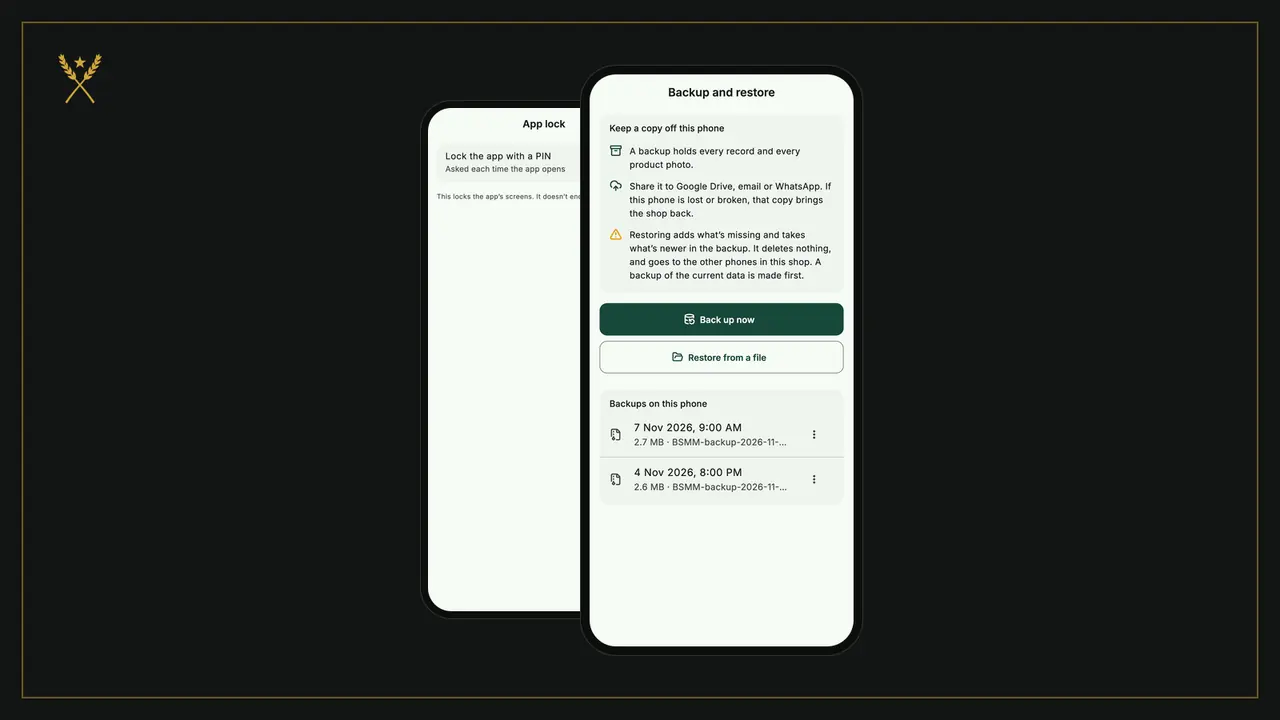
Is my customers' khata private? Only the people in your shop can see its records. You can also lock the app with a PIN, as shown in settings and your data.